A fast, private, open-source browser for Mac
Perch has an AI agent that can use the sites you're signed in to, running on your own ChatGPT, Claude or Grok subscription.
In development · macOS on Apple silicon
Speed comes first
Perch keeps Chromium's engine as it is and adds as little as it can on top. Each release is measured against Chrome built from the same Chromium version, and 1.0 ships only when it clears this bar.
The bar for 1.0, measured against Chrome
- Speedometer 3 and JetStream
- within 2%
- Cold start to a usable window
- no slower
- Perch's own additions, idle
- under 60 MB
- Memory with 100 tabs open
- half or less
Results are published here with the first release.
- Native tabs and toolbar
- The tab strip, toolbar and menus stay Chromium's own native code instead of being rebuilt as web pages.
- Nothing extra running
- No Google background services. The agent runs in its own small process that sits idle until you ask it for something.
- Less for pages to load
- The built-in blocker stops ads and trackers before they download, so pages fetch and run less.
- An agent that reads the page
- The agent works from the page's structure, its text, buttons and fields, and drives the browser over a private connection instead of clicking around a screenshot.
An agent that asks before it acts
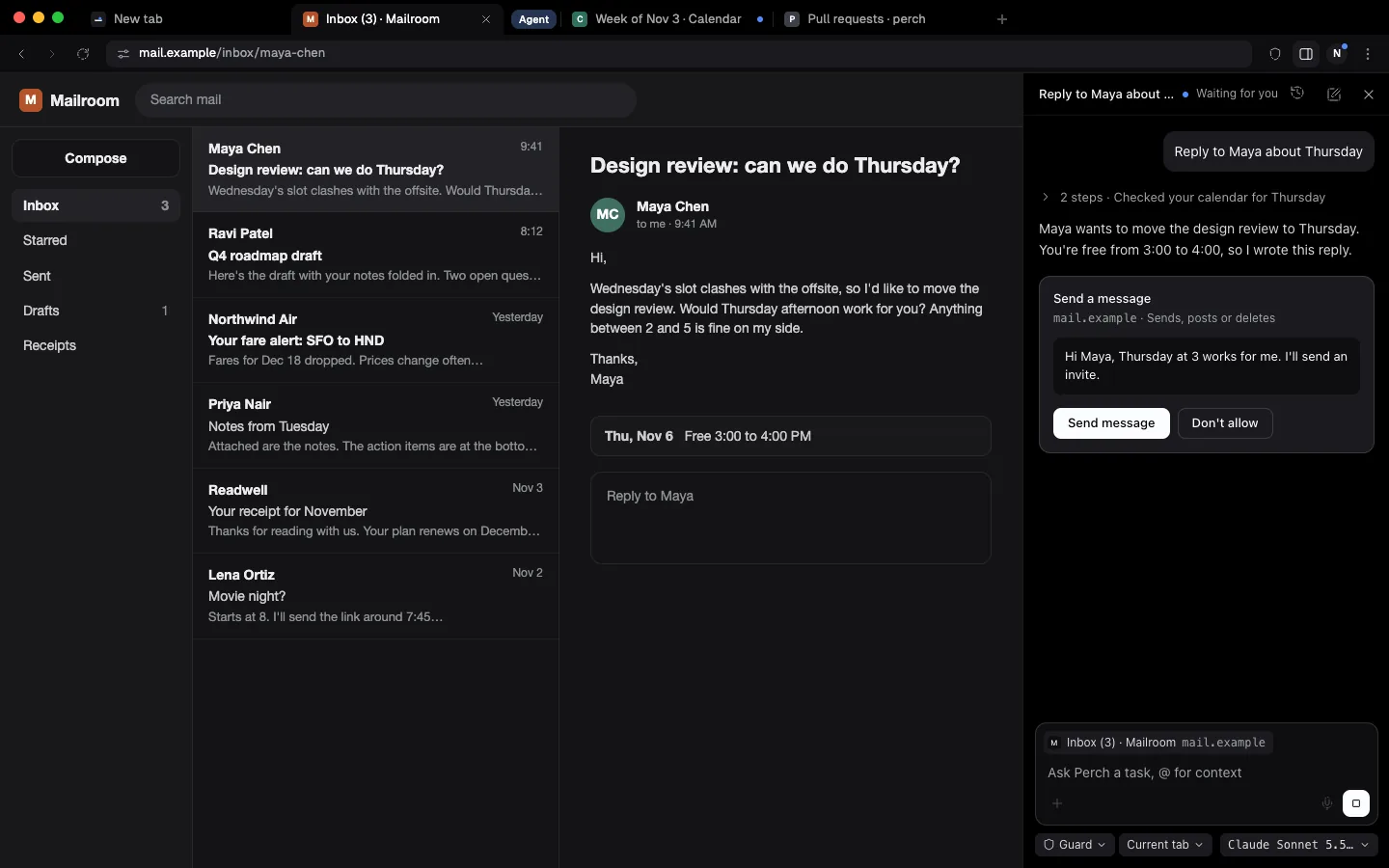
Open a side chat on any tab and say what you need done. The agent reads the page, clicks and types in it, and lists each step as it goes. A side chat belongs to its tab: switch tabs and you see that tab's chat, switch back and yours is where you left it, draft included.
- Approval cards
- Before anything is sent, posted, bought or deleted, Perch shows exactly what will go out, such as the message text or the order total. The button names the action, like Send message.
- Permission modes
- Ask waits for you on every change. Guard, the default, reads, searches and fills forms on its own and asks before it sends anything. Skip confirmation runs without asking, but payments and password changes still wait for you.
- Site rules
- Mark a site always allow, always ask or never touch. Never touch keeps the agent off a site entirely, your bank for example.
- An audit log
- Every action the agent takes is recorded with the time, the site, which client asked for it and whether you approved it.

Bring the model you already pay for
Perch has no paid plan and no model of its own. Connect what you have, and pick a different model for each kind of work: a quick one for summaries, a stronger one for planning, one that can read images.
- ChatGPT and Codex
- Sign in with your ChatGPT account.
- Claude
- Perch runs the Claude Code you already have installed, which keeps its own sign-in. Perch never reads its tokens.
- Grok
- Sign in with your Grok account.
- API keys and local models
- Keys for Anthropic, OpenAI, xAI, Google Gemini and OpenRouter, or any OpenAI-compatible server, such as Ollama or LM Studio on your Mac.

Chromium underneath
Perch is a fork of Chromium, the engine Chrome is built on. Extensions from the Chrome Web Store install and run as they do in Chrome, and sites behave the same way.
Perch copies bookmarks, history, passwords and cookies from the browser you use now, reinstalls the extensions you had in a Chromium browser, and brings memory, skills and chats over from Aside.
Imports from
- Chrome
- Arc
- Dia
- Safari
- Firefox
- Brave
- Edge
- Vivaldi
- Opera
- Helium
- Zen
- Comet
- ChatGPT Atlas
- Aside
Private without extra setup
Perch works without an account, and what it stores stays on your Mac unless you choose to sync.
- No telemetry by default
- Perch sends no usage data unless you opt in. Settings lists every background connection it makes, such as extension updates and Safe Browsing lists, each with its own switch.
- A blocker built in
- Ads and trackers are blocked with the EasyList and EasyPrivacy rules. Cookie banners are rejected where the site offers a way to reject, and tracking parameters such as utm_ and fbclid are taken off links.
- Sync the server can't read
- Sync is optional. Your data is encrypted on your Mac before it leaves, and the server keeps only ciphertext, sizes and timestamps.
Other agents can use it too
The perch command and its MCP server let Claude Code, Codex and agterm tabs hand Perch a whole task or work a tab step by step. One command sets up each of them.
Every outside client gets its own permission mode, Guard unless you change it, and you can revoke any of them in Settings.
# add Perch's skill and MCP server
perch skill install claude

# hand a whole task to an agent
perch exec "Add the Readwell receipt to my budget sheet"

# or drive a tab yourself
perch open https://example.com
perch snapshot
perch click e12
Open source, MIT licensed
All of Perch is on GitHub: the Chromium patches, the agent, the interface and the sync server. You can run your own copy of the sync server on Cloudflare and point Perch at it, and your data stays end-to-end encrypted there too.
Perch is in development, and the first release comes once every feature works. Watch the repository to hear when it's out.